How do I set up departments or groups?
Overview
This article explains how to create and manage departments or groups within Dictalogic.
Applies to
Administrators
What are departments?
Departments or groups in Dictalogic allow you to organise users into logical units that reflect your organisation’s structure for example, by practice area, clinical specialty, office location, or team. Departments serve several purposes: they allow assignment rules to route dictations to the correct pool of secretaries for a given author or work type, they enable reporting to be segmented by department, and they make it easier to manage large numbers of users.
Creating a Department
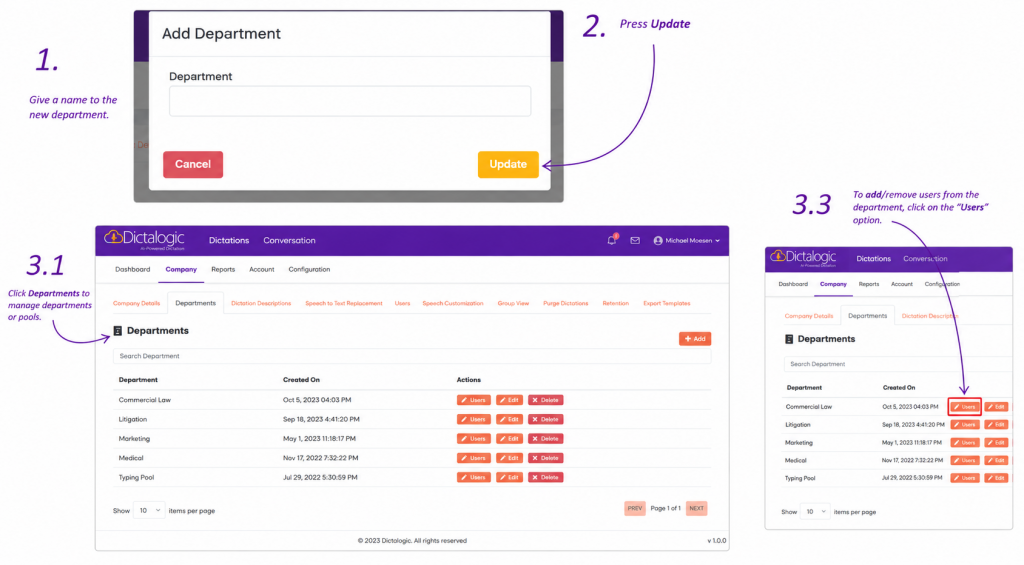
Log in with administrator credentials and navigate to the Department or section of the administration settings. Select the option to create a new department. Enter the department name and any relevant configuration options. Save the department. Users can then be assigned to the department when their accounts are created or updated.
Assigning Users to Departments
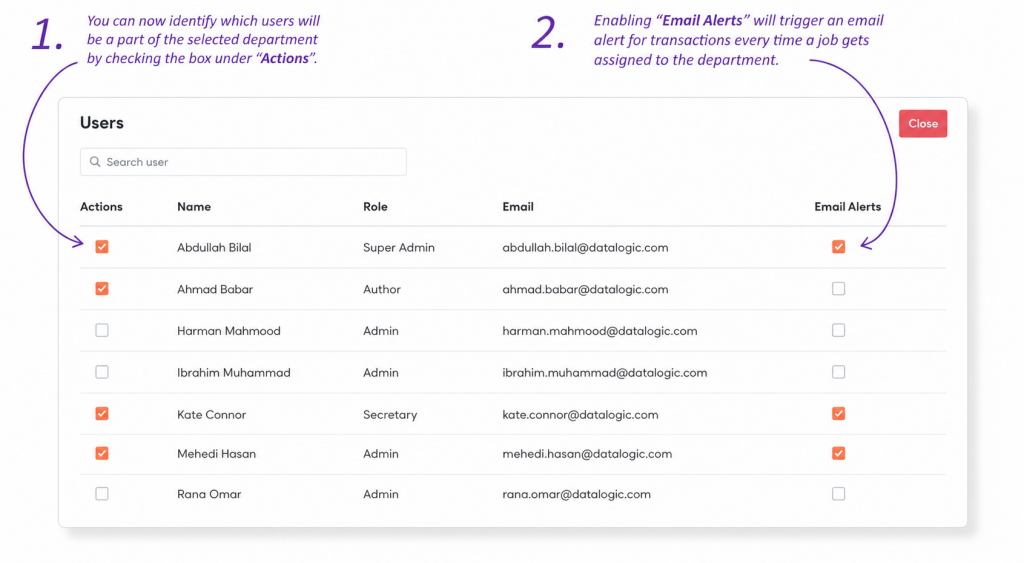
Users are assigned to departments through the user management section. Edit a user’s profile and select the appropriate department from the available options.
Department-Based Assignment Rules
Once departments are set up, assignment rules can be configured to automatically route dictations from authors in a specific department to the corresponding secretary pool.