How can you manage your work queue as a transcriber?
Overview
This article explains how secretaries and transcriptionists manage and organise their work queue within Dictalogic.
Applies to
Secretaries, Transcriptionists
Accessing your work queue
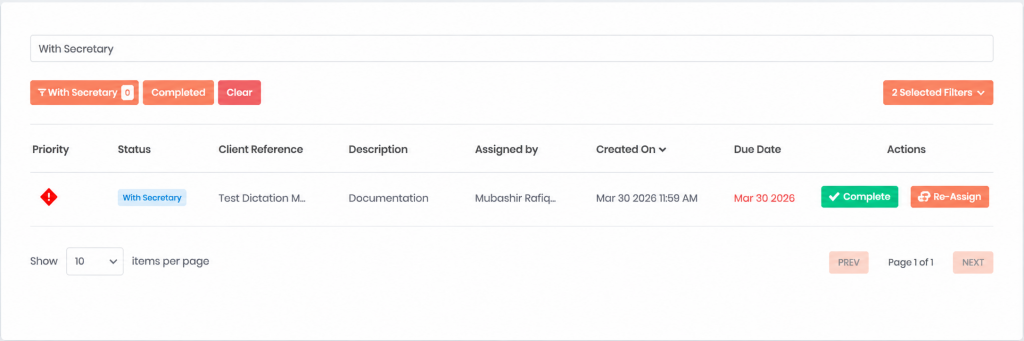
Log in to the Dictalogic web portal using your secretary or transcriptionist credentials. Your dashboard is your work queue. It displays all tasks currently assigned to you or available for acceptance from a shared pool. Tasks are shown with key details including the author’s name, the work type or description, the date submitted, the priority level, and the current status.
Understanding what is in your queue
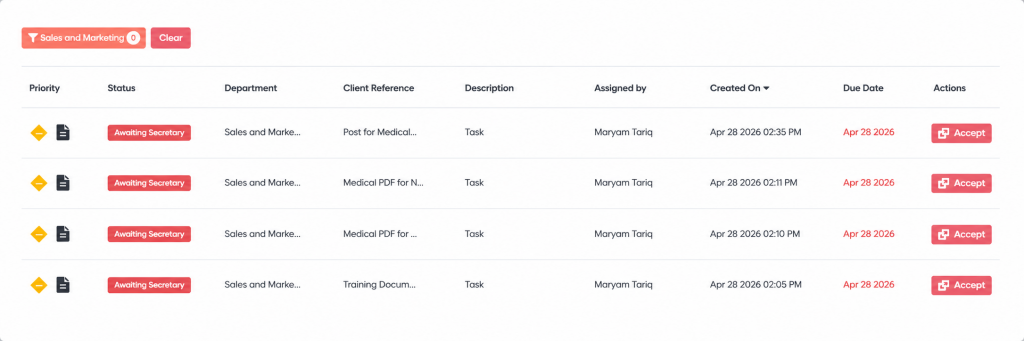
Tasks with the status “With Secretary” have been directly assigned to you and are ready for you to begin. Tasks with the status “Awaiting Secretary” in a department pool are available for acceptance. They have not yet been claimed by any individual. Tasks with the status “Being Typed” are tasks you have already started and are actively working on.
Accepting tasks from a pool
If your organisation uses a shared department pool, navigate to the pool queue and review the available tasks. Select a task and use the Accept or Take On action to move it from the shared pool to your personal queue. Once accepted, it will appear as “Being Typed” or “With Secretary” in your personal dashboard.
Organising your queue
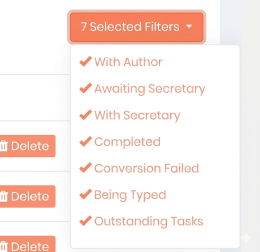
Use the filter and sort options on your dashboard to organise your queue. You can sort by date submitted, priority, work type, or other available columns. Filter by status to focus on specific types of tasks, for example, show only tasks.
Marking tasks complete
Once you have finished your task, mark the task as Complete. This notifies the author that their document is ready and moves the task to the Completed status.